If it ain't working, then Change it...
Is there someone who always acts in a specific negative way that makes you feel uncomfortable?
It could be their way of dealing w/ a specific issue or situation.
Like if you both disagree, then this person gets in a huff, you see it on their face, they shut down, they want to change the subject.
Or they go the other way...they get obnoxious, their voice gets really loud, you can see it on their face?
Or you fill in the blank...
But whatever it is, it makes you feel uncomfortable.
NOTE: I am not talking about abusive situations where someone physically or emotionally harms you and you feel threatened in anyway...such as w/ your spouse, partner, boy/girlfriend, parent you live with. In this type of situation, You Need professional help. I highly recommend if you are in This type of Abusive relationship, Please Go and See a Therapist and get professional help from them. Or call your local domestic violence agency [Google it] or call the police or if you feel safe..leave.
What do you do?
Well, you can continue doing what you're doing in response.
But, I bet that's not working bc it's a cycle...a routine pattern...that you both do.
This means you both will be doing this over and over.
OR
Change the way YOU respond to their patten response.
And, then see what happens.
This may take some finagling...you may have to try different things and you determine if it gets the result you want.
Why do I have to "change"?
Well, you're getting yourself OUT of the cycle. So that's a good thing.
And, you know from experience, You'll be holding your breath if you wait for them to change theirs on their own.
But, if you change how you react, then this may start a chain reaction and cause their reaction/non-reaction to change.
So, when they "shut down" and they make it clear they're "upset" w/ you and the topic or situation, You STOP, Think, and React or Don't react to them in a Different way. And, then see what happens.
If you normally start "shutting down" also bc you are uncomfortable with where this is all going and don't want things to escalate, then instead Say something Positive or in some cases something Direct. And see what happens...
If you normally React a certain way....like yell, or start talking alot or placate them like apologizing when you're Not wrong but just want Peace...aka you react, Then do it differently...talk in a normal tone, inform them how this situation is making you feel, or don't talk at all and stand there and see what happen
You probably already know the "hotspots".
So, before you and that person get into Round 2, think about a different way you will react. Then, when you are in the situation, TRY IT OUT. See what happens. Not getting the result you want? Then, think of Another Way to handle it and do That Next time.
Like I said...it'll take some finagling.
How do you know what makes you feel uncomfortable?
When you think about it aLOT afterwards and wish that person wouldn't react or not react that way OR you feel stifled and wish you said something....you get the picture.
Here's my example...
My mom and I are sometimes [or a lot of times] like oil and water. We have this pattern where we can be talking 1 minute and the next minute we are arguing about something stupid and the conversation sounds like this... "why did you say that to me", "no I didn't", "Yes, you did", "You're too sensitive...I never said that", "I wish I recorded this so you can hear yourself", etc etc etc....talk about a vicious cycle that goes nowhere. This happens also when she starts asking me a lot of questions and if I answer her...this inevitably leads to her nitpicking on something I said...which leads to us "getting into it" over the phone.
Recently, I decided to change the way we communicated bc I knew she wouldn't. When I have a "feeling" that we are going into that mode of "crazy" talk, I Stop myself from reacting to whatever she said that "bugs me", and just tell her "I don't want to talk about this". And miracles beyond miracles....it worked! She immediately says "OK" and we move on. World War 3, 4, & 5 has been averted...all humans on this planet are still alive.
Think of it this way....if something doesn't work, then Do NOT do it. Try something else and see what happens. Life sometimes is a lot like Groundhog Day [with Bill Murray] where you feel like you've been here before...ugh, yeah, 'cause you have.
So, give it a different try and see what happens.
You will be pleasantly surprised when you see the outcome is way better than before.
Peace out my fellow "Happiness Seekers"...peace out. ( :
If you find my posts helpful, please "Like" my Facebook Page Stacy Cheng SuzukiCoach

Wednesday, November 20, 2013


Monday, November 18, 2013
You are Not your Bad Decision...Got it? Now, Give yourself a Hug and a Break
You are NOT your "bad" decision...
We all have done it right? Made that...in hindsight..."bad choice".
And then we dwell upon it.
Replay like a broken record the incident leading up to our "bad choice' over and over and over again.
Sound familiar?
You are Human.
You are Not alone.
Every single Person on this planet has made "bad choices".
What can you do to stop yourself from beating yourself up?
Give yourself a break. And, a Big Hug.
You're probably kinder to other folks than you are to yourself, right?
You've forgiven even strangers for worse stuff than you are whipping yourself for, right?
Remember....You are a vulnerable caring person also...so give yourself a Break.
Now.
There are No bad or good decisions.
There are only choices which take you one way or the other.
It's part of your Lesson here on earth in this Lifetime.
You goofed up? Said the wrong thing? Did the wrong thing? or didn't say or didn't do the right thing?
This is your Lesson.
Do Not replay it in your head.
From this lesson, the Next time, you'll choose the other path.
And the choice you made that you felt was a "bad one", what do I do, you ask?
Learn from it. That's all. Then let it go...and Move on.
One foot in front of the other.
One day at a time.
That's what being Human is all about.
Not getting it "right", Not getting it "wrong".
Living and learning and moving forward towards the Light.
Yes, you can do it grasshopper.
Like you, I'm learning this lesson All the time.
I'm learning to get rid of that record player and put on some walking shoes because I've got a lot of miles to go.
Let's go there together.
Peace out my fellow "Just Wanna Be Happy" friends...Peace out. ( :
If you find my posts helpful, please "Like" my Facebook Page Stacy Cheng SuzukiCoach
We all have done it right? Made that...in hindsight..."bad choice".
And then we dwell upon it.
Replay like a broken record the incident leading up to our "bad choice' over and over and over again.
Sound familiar?
You are Human.
You are Not alone.
Every single Person on this planet has made "bad choices".
What can you do to stop yourself from beating yourself up?
Give yourself a break. And, a Big Hug.
You're probably kinder to other folks than you are to yourself, right?
You've forgiven even strangers for worse stuff than you are whipping yourself for, right?
Remember....You are a vulnerable caring person also...so give yourself a Break.
Now.
There are No bad or good decisions.
There are only choices which take you one way or the other.
It's part of your Lesson here on earth in this Lifetime.
You goofed up? Said the wrong thing? Did the wrong thing? or didn't say or didn't do the right thing?
This is your Lesson.
Do Not replay it in your head.
From this lesson, the Next time, you'll choose the other path.
And the choice you made that you felt was a "bad one", what do I do, you ask?
Learn from it. That's all. Then let it go...and Move on.
One foot in front of the other.
One day at a time.
That's what being Human is all about.
Not getting it "right", Not getting it "wrong".
Living and learning and moving forward towards the Light.
Yes, you can do it grasshopper.
Like you, I'm learning this lesson All the time.
I'm learning to get rid of that record player and put on some walking shoes because I've got a lot of miles to go.
Let's go there together.
Peace out my fellow "Just Wanna Be Happy" friends...Peace out. ( :
If you find my posts helpful, please "Like" my Facebook Page Stacy Cheng SuzukiCoach
Friday, May 17, 2013
Tulips and Roses...Happy Friday!

Just a little something something that I put together...Roses and Tulips.
Happy Friday!
Do you LoVe LoVe it?
Sunday, May 12, 2013

Friday, April 12, 2013
My Super 7 Melody's Stone Sterling Silver Wide Band Ring

I put 2 layers of Sterling Silver for the base of the ring to give it more interest. Added small beading around the bezel's base. Put 2 petite Gold Filled Rivets above and below the Super 7. On the wide ring band, I free hand engraved the words "Faith" and "Believe". Lastly, I oxidized the ring a deep black and then polished it back to silver but left areas Gray/Black for that grunge look and to make everything "pop". I prefer this look to bright "silver silver".
I'm going to make more rings. When I'm comfortable (and when I have enough rings..but who can have enuf?), I'll list some for sale in my Etsy Shop... Stacy's Designs 88.
Friday, January 25, 2013
Hello Kitty French Tip Gel Nails...LoVing Them!
Yes, I admit it...I LoVe Hello Kitty. Who doesn't?
So, how would it be to be able to see her cute little face everyday?
HaPPy HaPPy HaPPy

My Hello Kitty French Tip Gel Nails

Another shot....just because.
Gel Nails...try them and you will be hooked. This is the 2nd time I've gotten Gel Nails.
My last one lasted 4 weeks. You know that I'm very hard on my nails with creating jewelry, tapping on my keyboard for hours, and just everyday living...washing hands, washing hair, washing dishes...
So happy with the quality of the gel nails I decided to upgrade and get Hello Kitty French Tip Nails in Gel. My manicurist even added a puffy Red bow...cherry on top of my sundae!
Thursday, June 14, 2012
Etsy's New "About" Page...A View in My Artisan Studio & Life
 |
| My Sketch Books...drawing out new designs |
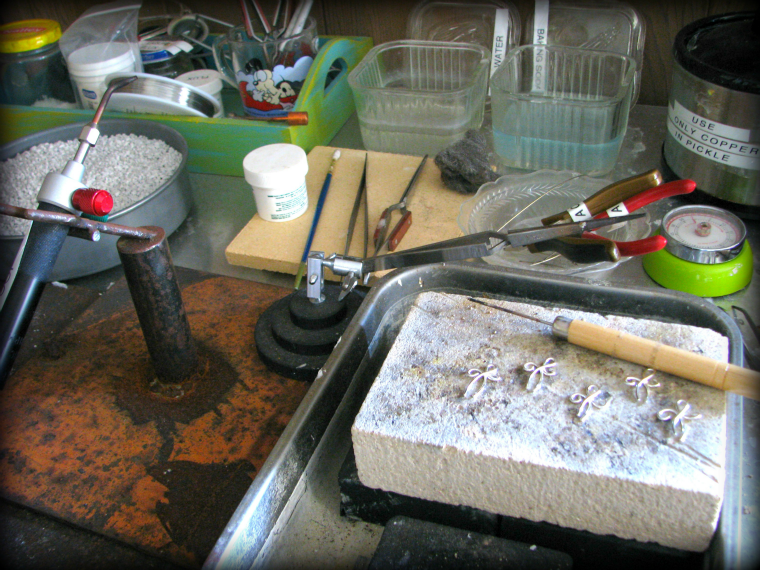 | ||
| My Silver Smithing Station...where some of the Magic happens |
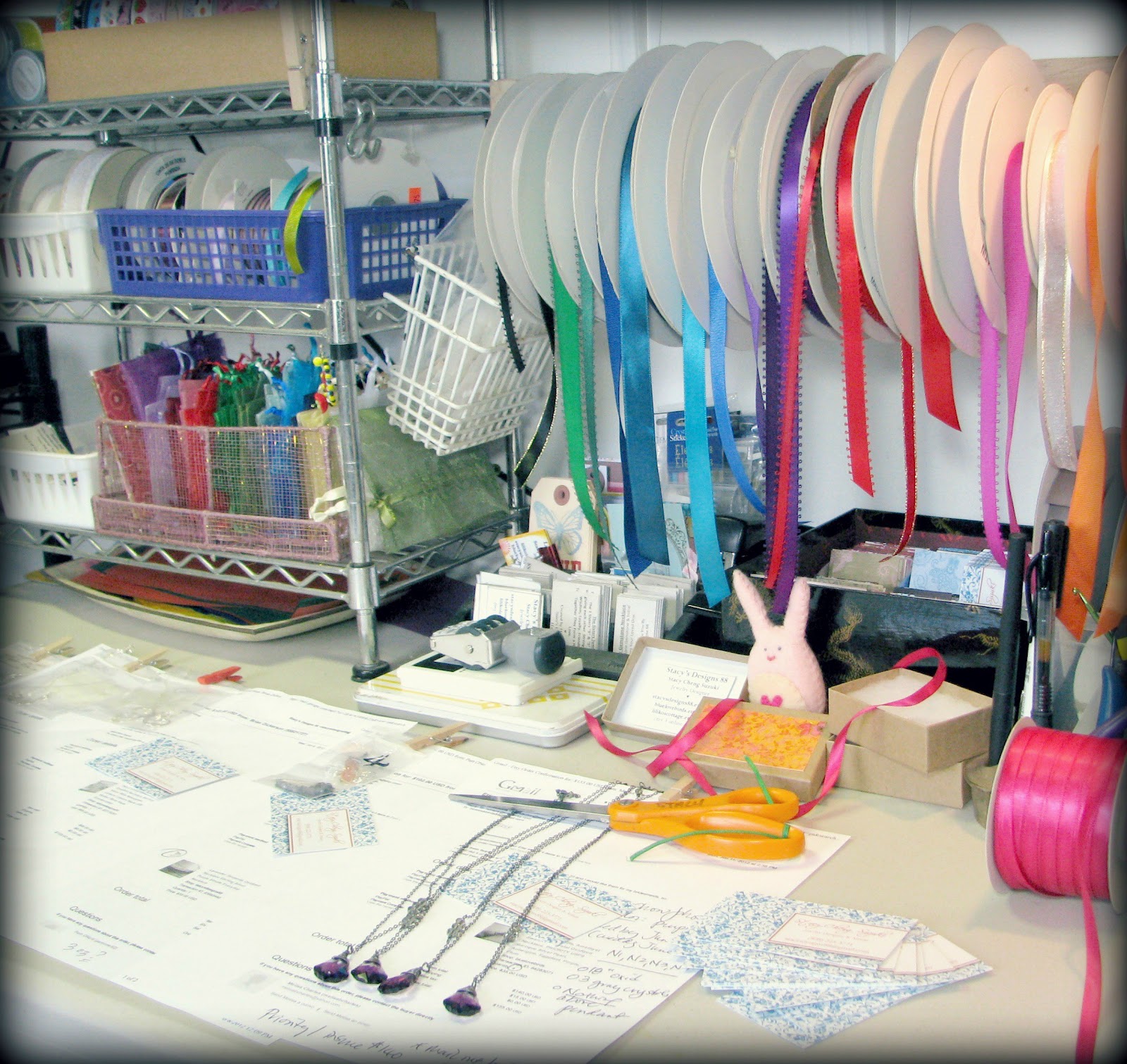 |
| My Packaging Table where Color abounds |
Etsy has a new feature called "About". It allows Etsy Artisan Shop Owners to tell their story with words and photos. So, I used this as an opportunity to take some much needed photos of some of my process.
For all you Etsy shop owners, here's a helpful write up and video by Etsy... click HERE.
Watch the video bc it's very helpful and shows you where to go in your shop to start creating your "About" page. I'm not going to discuss the basics on set-up bc they go thru that on the video.
To help you understand what I'm talking about below a lot better, I suggest you check out my "About" page first. To see my Etsy Shop Stacy's Designs 88's "About" page...click HERE.
My Helpful Hints and Tips for Etsy Shop Owners creating their "About" Page...stuff that's not on the video:
Shop Member Photos:
Etsy wants You to show the "human side" of your shop. So, they want you to use your photo...to show your face behind your shop.
It's here that you can reveal the other folks who help with your shop.
For my photo, I used a photo I've used before which I like. Bottom line is that you should put your Best Face forward. So choose a photo or take a photo of yourself that you Like.
Also, I uploaded a photo of my husband Jimmy..another shop member...as he creates jewelry which I put in my shop and lends a hand when I get tons of orders.
Important Tip:
While you're in Edit, you can move the order placement of your Staff photos by simply "grabbing" the photo and moving it to the position you want. This is the same thing you do while your Listing an item when you want to move around the photos.
The Owner's photo should be to the Extreme Left. Then, it'll show up as the Largest Photo on your page. Your Staffers photos will be under yours and slightly smaller. The Staffer's title will not show up on the page. You can see it when you move your cursor over their photo.
The Story Section:
This is your spot to say what you want. Obviously, put your "marketing" hat on when you do this. What do you want folks to know about you? What will grab there attention? What will get them to "see" who you are? What's your story? Why are u different from the 1000s of other Etsy shops out there. What inspires you? What makes you do what you do? How is it that you do what you do?
One of the marketing reasons for telling your story is if customers get to know you and like you, then you've added that much more value to what it is your selling with a higher chance of them buying from you. The flip side is that not everyone's story is going to tug that right chord in every potential customer. Just do your best and speak from your heart.
For my Story section, it's still a work in progress. I keep going back and fuss with it. Changing a word here, taking out words there. It's getting there. It has a serious tone to it and I'd like to kinda give it a more light hearted tone but it needs work to get there.
Choice of Photos:
You get to upload 5 photos of you, your process, and whatever else you want to convey thru pictures. So choose wisely.
I knew I wanted to show them my sketch books with drawings that wasn't giving away "secrets", my work station where I solder jewelry, my packaging bc my clients really love my gift wrapping.
Later, for my 4th photo, I decided that I wanted to show a custom job and contacted my client and asked her permission to use her grandmother's photo which she had sent me previously. She readily agreed. I created a collage using PicMonkey (which replaces Picnik..now defunct) using photos taken of her custom order.
For my 5th photo, I still have to do it. I'm leaning towards showing my gemstones and sterling silver components so my potential clients get a sense of the quality and breadth of components that I have available to use for their jewelry. And colorful gemstones always makes a gal's mouth water right?
5 Cropped Photos:
Note that when you upload your photos, it will auto crop it. What I've discovered from much trial and error is that they keep the Top 2/3rds of your photo and crop off the bottom. So, when you're taking photos, make sure that all the good stuff is at the top 2/3rds of your screen and leave the bottom 1/3rd bare or with stuff you don't want in your photo anyway.
While I was editing my photos for this section, I saved it at 760 bc Etsy says that it'll display your auto cropped photos at 760px by 428px.
Rotating 5 Photos:
These 5 photos will automatically rotate thru.While you're in Edit, you can move the order placement of your photos by simply "grabbing" the photo and moving it to the position you want. This is the same thing you do while your Listing an item when you want to move around the photos.
Saving:
Remember to "Save" your work. The "Save" button is located at the bottom of the page. Everytime I made an edit or change, I would press the Save button and then check out what it looked like on my actual "About" page.
Two Tabs Open to Speed Up Editing and Review:
While editing, I always have 2 tabs open to speed up the process of editing and review. One in the Edit mode and the other in the "About" page. Note: you need to have made your "About" page live or "published" and open to the public to do this.
So, everytime I make a change or edit and then press "Save", I then go to my 2nd tab to my live "About" page and press the "refresh" or "reload" page button so I can see what my latest edits look like on my page.
TRY IT OUT:
I feel that the "About" page is a really great idea. It's going in the direction as Facebook. Personalize Personalize Personalize. In this internet world, folks still want to and are dying to "connect" with each other thru their computer screen or Ipads or Nooks or Kindles or cell phones. If they know a little bit about what makes you tick, then there's a connection.
Remember, on your "About" page, it's easy to Edit. easy to change things. it's not do or die. Put something up. give it a try. if you don't like it, then edit until you get it just right. but you gotta start with one photo, one word, one sentence. the rest will be easier.
NOTE:
I'm going to end here. But, I may come back and Add to this post after I've fussed around with my page more. So check back.
Subscribe to:
Posts (Atom)
LinkWithin
